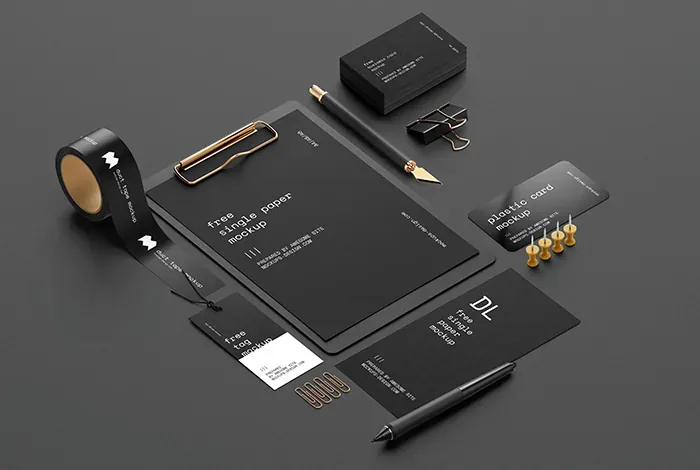
Designers' Secret Weapon: 20+ Mockup Sites to Impress Your Clients (2025) — post content
One of the most exciting moments of being a designer is when you bring your idea to life. But one of the most frustrating parts is the boring, repetitive, and time-consuming work required to present that great idea to the client or to the world. Spending hours in Photoshop or Sketch to show a website design across different screen sizes, place a logo on a t-shirt, or visualize how a packaging design will sit on a shelf is not the most productive use of your creative energy. Spending this valuable time tweaking pixels instead of finding your next big idea is a common pain for every designer.

Fortunately, technology offers an elegant solution to this problem: Mockup sites and applications. These platforms are like magic wands that allow you to place your designs into photorealistic environments in seconds. By offering hundreds, even thousands, of ready-made templates, they let you dress your designs onto an iPhone screen, a billboard, or a coffee cup with just a few clicks or by dragging and dropping. In this guide, we have compiled the best 20+ mockup sites and tools that will allow you to stop reinventing the wheel and focus on the more creative and strategic aspects of your role. It's time to put an end to the presentation-preparation nightmare and showcase your designs with the professionalism they deserve.
What Is a Mockup and Why Is It So Important?
In the simplest terms, a mockup is a scaled or full-size model that shows how a design will look in a real-world context. It allows a design to be presented not just as a flat screenshot, but as a living, breathing product. So why is using mockups so critical?
- It Provides Context: A logo, on a blank canvas, is an abstract symbol. But on a business card, a sign, or the splash screen of an app, it instantly gains meaning and function. A mockup adds context to your design and tells its story.
- It Makes Client Persuasion Easier: Clients often struggle to imagine abstract designs. Showing them how the brochure you designed will look on a desk or how the mobile app will appear on a phone shortens the revision cycles and helps the project gain approval faster. "Seeing is believing."
- It Provides a Professional Presentation: A carefully crafted mockup presentation shows how much you value your work and how much attention you pay to detail. It instantly takes your portfolio or client presentation to the next level.
- It Helps You Catch Mistakes Early: It lets you notice, before going to print or coding, that a packaging design doesn't sit as you expected on the curved surface of a product, or that a website interface becomes unreadable on a small phone screen.
Choosing the Right Mockup Tool: Which Type Suits You?
Mockup resources generally fall into three main categories:
- PSD Mockup Templates: These are layered files you can open and edit in Photoshop. Thanks to Smart Objects, they let you easily place your own design. They give you full control over light, shadow, and colors. (E.g., Mr. Mockup, Graphic Burger)
- Browser-Based Mockup Generators: These are platforms that work directly through your web browser without requiring any software. They typically use drag-and-drop logic and are extremely fast. (E.g., Placeit, Smartmockups, Artboard Studio)
- Apps and Plugins: These are tools you install on your computer or integrate into design programs like Figma/Sketch. They let you create mockups without leaving your workflow. (E.g., Mockuuups Studio)
Depending on your project's needs, your budget, and your technical knowledge, you can use one or several of these types together.
Curator's Pick: The Best 20+ Mockup Sites and Tools of 2025
We've categorized our list to address different use cases and budgets.
Category 1: Comprehensive All-in-One Platforms
These platforms are massive mockup libraries offering thousands of templates and typically a browser-based editor.
-
1. Placeit
Ideal For: Anyone who needs fast, easy, and varied (t-shirt, mug, social media, video, etc.) mockups, especially e-commerce sellers and social media managers.
Detailed Analysis: Placeit probably has the largest mockup library on the internet. It offers not only device mockups but also clothing, printed materials, and even animated video templates. It is incredibly easy to use: pick a template, upload your design, and you're ready in seconds. While it offers a free selection, its real power lies in tens of thousands of premium templates unlocked through a monthly or yearly subscription.
-
2. Smartmockups
Ideal For: Professionals who seek high-quality, photorealistic mockups and want a solution for both technology and print products.
Detailed Analysis: Smartmockups stands out with its quality and ease of use. It offers carefully curated templates across a broad range, including technology (phones, computers), print (books, business cards), and apparel. Its integration with Canva lets you send a design you've made in Canva to Smartmockups with a single click and turn it into a mockup. The free plan is quite generous, and the Pro plan offers access to the entire library and advanced features.
-
3. Artboard Studio
Ideal For: Creative designers who want not just to drop designs into ready-made templates, but to build their own mockup scenes from scratch.
Detailed Analysis: Unlike the others, Artboard Studio gives you a blank canvas and thousands of individual objects (phone, plant, table, pen, etc.). By combining these objects, you can create your own original mockup compositions. It also offers animation features, allowing you to prepare animated presentations. This browser-based platform is a playground for those who want full creative control over the mockup creation process.
Category 2: High-Quality Premium and Boutique Mockup Stores
These sites typically sell extremely high-quality, carefully crafted PSD templates focused on a specific aesthetic.
-
4. Envato Elements
Ideal For: Those who want unlimited access not just to mockups, but also to fonts, graphics, stock video, and other digital assets with a single subscription.
Detailed Analysis: Envato Elements is a "Netflix for creatives" model. With a monthly subscription, you get unlimited access to tens of thousands of high-quality PSD mockup templates and millions of other creative assets. The quality is generally very high and the variety is dizzying. It is one of the most cost-effective solutions for agencies and freelancers who constantly work on different projects.
-
5. Layers.Design
Ideal For: Design-conscious brands and agencies looking for a minimalist, modern, stylized, and "cool" aesthetic.
Detailed Analysis: Layers is one of the design community's favorites. Their mockups are typically urban, minimalist, and extremely stylish. Perfect for those who want to make an original and artistic presentation, far from the standard stock-photo feel. They are sold as paid packs, but the unique aesthetic they offer can be worth the investment.
-
6. The Templates (by The Brand Identity)
Ideal For: Brand identity-focused designers seeking neutral, refined, and ultra-realistic mockups.
Detailed Analysis: Offered by the respected design blog The Brand Identity, this collection focuses on quality and realism. Their templates, especially for printed materials (magazines, posters, packaging), stand out with their use of light and texture. Each template is crafted with the meticulousness of a work of art.
-
...and Other Boutique Options
Sites like House of Mockups, Mockup Maison, and YouWorkForThem similarly offer high-quality premium PSD mockups, often focused on a specific aesthetic. If you're looking for something unique that fits your project's style, these boutique stores are worth a look.
Category 3: Free PSD Mockup Resources and Aggregator Sites
These platforms offer free, high-quality PSD mockup templates compiled from across the internet or produced in-house.
-
8. Mr. Mockup
Ideal For: Those seeking high-quality and professional PSD mockups with both free and premium options.
Detailed Analysis: Mr. Mockup is a resource that stands out for its quality. Even the templates they offer for free are higher quality than the ones found on many paid sites. They are particularly strong on packaging, printed materials, and device mockups. The "Showcase" section inspires by showing how other designers use these mockups.
-
9. MockupTree
Ideal For: Those looking for ready-to-use, completely free PSD templates in various categories.
Detailed Analysis: Mockuptree offers a wide free mockup archive. The site is divided into clear categories (devices, packaging, apparel, outdoor, etc.) that make it easy to find what you're looking for. Technical info such as file size and dimensions is provided for each mockup.
-
10. The Mockup Club
Ideal For: Those who want to find the best free mockups on the web in a single place.
Detailed Analysis: Rather than producing mockups itself, this site curates and links to the best free mockups from various places on the internet. They constantly add new resources and check that the links are current and safe. This is a great way to discover quality free resources from a single address rather than searching across different sites.
-
Other Notable Free Resources
Sites like Graphic Burger, Pixeden, and Unblast are also reliable platforms that have offered the community high-quality free PSD mockups, icon sets, and other design resources for many years.
Category 4: Fast and Focused Browser Tools
These tools are typically web apps that do a single job (for example, placing a URL onto a phone screen) with incredible speed and simplicity.
11. Screely
It instantly places your screenshot inside a stylish browser window or device frame, making it presentation-ready. It offers simple customizations such as changing the background color. Perfect for fast and clean presentations.
12. Shotsnapp
It lets you create beautiful mockups for various devices (phone, tablet, laptop, watch). You can easily change the background, device color, and orientation. It is completely free.
13. Mockuper.net
A simple yet effective tool. It quickly creates mockups for desktops, phones, and tablets, as well as printed materials such as posters and business cards. You get results in just a few clicks.
...and Others
Tools like Screenpeek, MockupsJar, Mockerie, Mockuuups Studio, and Dimmy.club similarly offer fast and practical mockup creation solutions with different interfaces and template options.
Conclusion: Work Smart, Not Hard
As a designer, your most valuable assets are your ability to think creatively and your time. Mockup sites and tools help you protect these two valuable assets. By automating the repetitive and tedious work of preparing presentations, they give you the luxury of focusing on the strategic and creative parts of your projects. By integrating one or several of the tools on this list into your workflow, you will not only produce more professional-looking presentations but also become a more productive, happier, and ultimately more successful designer. Stop reinventing the wheel; it's time to take that wheel and put it on the most beautiful car.


![10 Truly Great Open-Source Fonts | Free Fonts [Updated]](https://dogucanguler.com/storage/blog/wp/2020/12/2021-ucretsiz-fontlar.webp)
