How to Make a YouTube Video in 5 Simple Steps — post content
From Zero to the Top: How to Make and Publish a Successful YouTube Video in 5 Steps
YouTube... A massive digital universe where billions of people spend their hours every day, get information, are entertained, and find inspiration. Maybe you, too, want to be part of this universe — to tell your own story, showcase your talents, or get your brand's voice heard by wider audiences. You have a great video idea in mind, but questions like "Where do I start?", "How do I shoot it?", "How do I publish it?" keep spinning in your mind. Don't be afraid, you're not alone. Every big YouTuber was once at exactly the point you're at.
Whether you're a small business owner who wants to promote their products or just an individual who wants to share their passion, making and publishing videos to YouTube is no longer as complicated or expensive as you think. In this comprehensive guide, we'll break down the process of creating a YouTube video into five basic steps and cover every detail from A to Z, from the birth of the idea to the intricacies of production, from the secrets of editing to the ways to reach millions with your video. Buckle up, because your YouTube adventure is about to begin!
Step 1: Determine Your Strategy — Understand YouTube and Choose Your Video Type
First of all, you need to clarify why you chose this platform and what kind of content you'll produce. This is the most important part of your road map.
Why YouTube? Grasp the Power of the Platform
Why should you prefer YouTube over another platform to host your video? Here are a few crucial reasons:
- Massive and Instant Audience: More than 2 billion people use YouTube. This means your video can potentially reach a huge international audience instantly.
- Completely Free: You pay nothing to upload, host, and publish a video.
- Accessibility and Simplicity: You can shoot and upload a video in minutes even with a smartphone. The platform's interface is extremely user-friendly for both creators and viewers.
- Unlimited Storage and Bandwidth: Whether you upload one video or thousands... YouTube can handle all of them. Even if your video suddenly goes viral and is watched millions of times, you don't have to worry about server crashes.
- Instant Feedback: Thanks to comments, likes, and analytics, you can instantly measure your video's impact on people and shape your strategy for your next content accordingly.
What Kind of Video Will You Make? Find Your Identity
The second step of your strategy is to decide what kind of video you'll make. The format you choose should be in harmony with the spirit of your brand or personal identity. If you're a fun and energetic brand, a serious documentary may not be the right choice. Here are some of the most popular types of YouTube videos:
- Educational Content / How-To (Tutorials): Do you have expertise in a specific subject? A recipe, software usage, playing a musical instrument, or a repair process... Teaching people something is one of the most-watched and most valued types of content. For brands, this is a great way to demonstrate the use of their own products and prove their expertise.
- Product Reviews and Comparisons: People love watching reviews and analyses of something before they buy it. By honestly reviewing a tech product, a cosmetic, or a book, you can add value to your audience and become a trusted source.
- Video Series / Vlogs: Series where you regularly talk about a particular subject and share your experiences, or vlogs where you record your daily life, are the most effective ways to build a sincere and personal connection with viewers. If you have a charismatic and talkative personality, this format is for you.
- Slideshows / Montage Videos: You don't always have to be in front of the camera. You can create great montage videos by combining strong photos, screenshots, or short video clips with impressive music and voiceover. This is ideal especially for summarizing a complex subject or telling an emotional story.
- Comedy and Entertainment: Jokes, sketches, parodies... Making people laugh is one of YouTube's cornerstones. If you have a sense of humor, your potential to go viral in this area is quite high.
Remember, the Key to YouTube Success Is Retaining the Viewer: Whichever format you choose, your ultimate goal is to keep the viewer until the end of the video. The YouTube algorithm considers a video's "watch time" as one of the most important quality indicators. The longer your video is watched, the more YouTube recommends it to others. So make sure every second of your content is valuable and engaging.
Step 2: Create Your YouTube Channel — Set Up Your Digital Home
Now that your content strategy is ready, it's time to set up the digital home that will host this content — your YouTube channel. This step is both a technical requirement and the first official step of your branding.
- Sign In with a Google Account: YouTube is owned by Google. So you need to have a Google (Gmail) account to open a YouTube channel. Sign in to YouTube with your existing account.
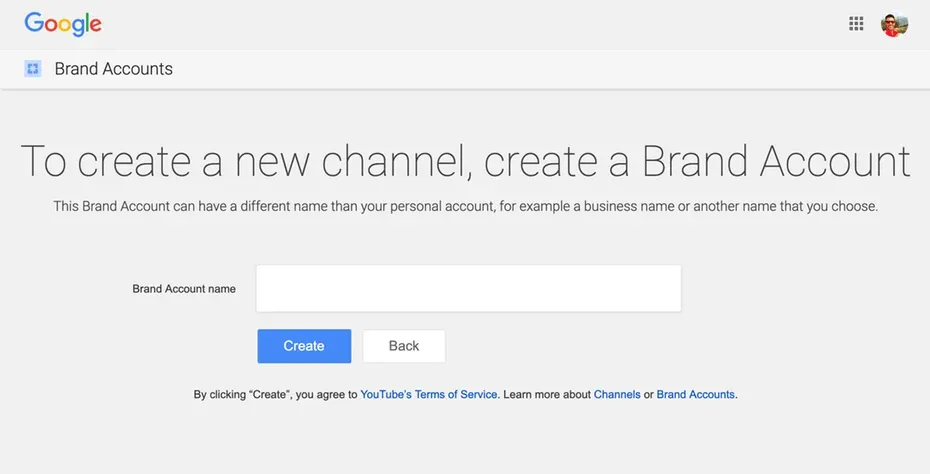
- Create a New Channel: Click on your profile icon in the top right and select "Create Channel" from the menu that opens.
- Brand Account or Personal Account?: YouTube will offer you two options.
- Personal Account: The channel name will be the same as your first and last name in your Google account. It's usually suitable for individual content creators.
- Brand Account: If you want to use a different name (company name, brand name, alias, etc.), you should choose this option. Creating a Brand Account also lets multiple people (your teammates) manage the channel as "managers". This is the strongly recommended option for businesses and teams.

After creating your channel, fill in fields such as profile photo, channel banner, About section, and social media links to give your channel a professional look. This will be your first storefront, telling your viewers who you are and what kind of content you produce.
Step 3: Create Your Video — The Three-Stage Production Process
Now we get to the most exciting part of the work: bringing your video to life. We can take this process under three main headings: Pre-Production (Preparation), Production (Filming), and Post-Production (Editing).
A. Pre-Production: Laying the Foundations of Success
- Idea and Brainstorming: You should be able to summarize the main idea of your video in a single sentence. Be as specific as possible. For example, "Healthy Eating" is a very general idea. "How to Make a Healthy Breakfast Smoothie in 5 Minutes?" is a great starting point.
- Research: Research what other videos have been made on YouTube about your topic. Analyze their titles, thumbnails, and most-watched sections. Identify what they do well and what you can do differently.
- Script and Outline: Your video should have a script. This doesn't have to be a word-for-word text, but at the very least you should prepare an outline that includes an introduction, the main narrative points, and a conclusion (call to action). This plan keeps you from straying off course during filming.
- Equipment Preparation:
- Camera: For starters, the camera of a modern smartphone is more than enough. For a more professional look, you can consider DSLR or mirrorless cameras.
- Sound: Bad sound ruins a good video! Using a cheap lavalier microphone or an external microphone instead of the camera's own microphone revolutionizes sound quality.
- Lighting: Good lighting makes your video look professional. Ideal is natural daylight from a window. If you're using artificial light, use at least two light sources (one main and one fill light) to soften shadows.
- Tripod: Shaky shots look amateur. Always use a tripod or a fixed surface to stabilize your camera.
B. Production: Time to Hit the "Record" Button
- Choosing a Location: Find a filming location that supports your video's content, is quiet, and is free of distracting elements.
- Filming: Stick to your script and shoot. Don't hesitate to film each scene a few times — this gives you more options at the editing stage.
- B-Roll Shots: A video where there's only your talking head can be boring. Detail shots related to the topic you're discussing, product visuals, or short shots from different angles (B-roll) add dynamism to your video.
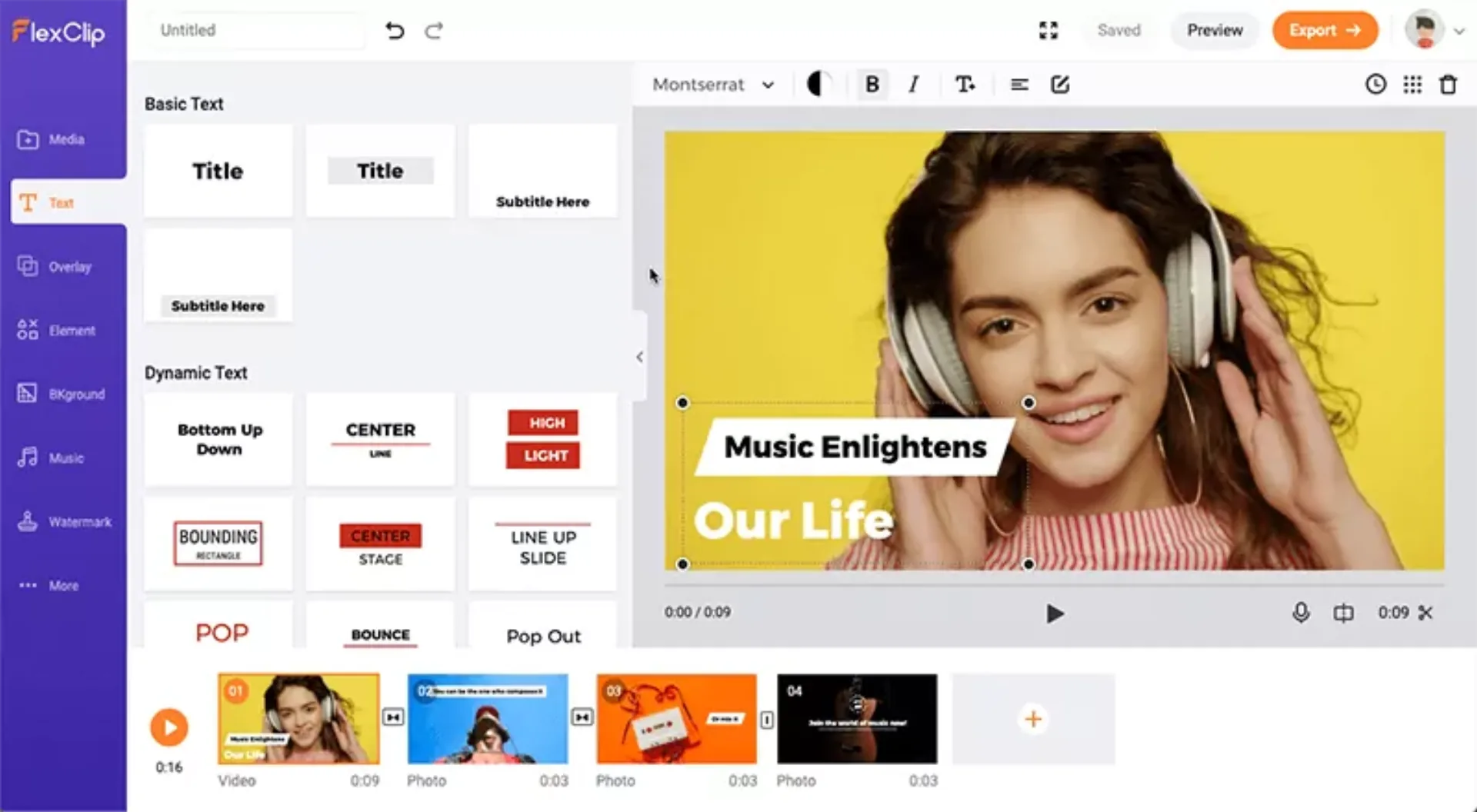
- Choosing Editing Software: For starters, you can use free programs such as CapCut (mobile/desktop), DaVinci Resolve (free professional software), or iMovie (for Mac users). For more advanced levels, Adobe Premiere Pro or Final Cut Pro are popular options.
- Edit the Clips: Move all the clips you've shot onto the timeline. Choose the best shots, cut the bad parts, and arrange them in an order that tells your story fluidly.
- Visual and Auditory Additions: Add B-roll visuals, titles, subtitles, transition effects, and your logo to your video. Adding light music in the background greatly affects the tempo and emotion of the video. (For copyright-free music, use the YouTube Music Library or services like Epidemic Sound.)
- Color and Sound Editing: Make the colors of your video more vivid and balance the sound levels.
- Export: Finally, export your video in the formats recommended by YouTube (usually MP4, 1080p resolution).
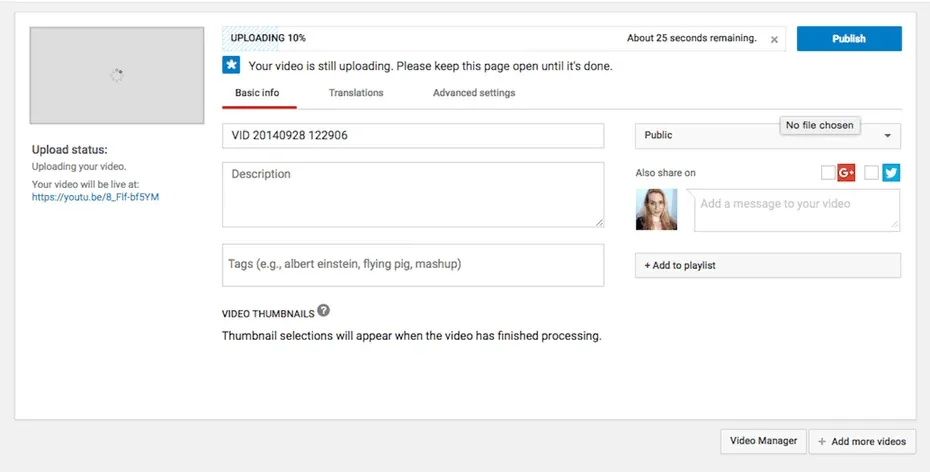
- Upload the Video: Sign in to YouTube, click the camera icon in the top right and then "Upload video". Drag and drop your video file into the window that opens.
- Title: Your title is the most important part of your video. It should be both intriguing enough to grab people's attention and informative enough to contain the keyword you're targeting.
- Description: The first few lines of the description section are the most important because they appear in search results. Summarize what your video is about and use your most important keywords here as well. You can also add links to your social media accounts, your website, or products you mentioned in the video.
- Thumbnail: It can be even more important than the title! The thumbnail is the image that decides whether or not people click on your video. Instead of the auto-suggested frames, upload a custom-designed, eye-catching, high-resolution, and curiosity-piquing thumbnail.
- Tags: Add keywords and phrases related to your video to the tags section. This helps YouTube understand the content of your video and associate it with similar videos.
- Publish!: After filling in all these fields, set the visibility setting to "Public" and click the "Publish" button!
- Promotion: Share your new video on all your social media accounts, your blog, your email newsletter, and in relevant forums.
- Engage with Comments: Be sure to respond to comments on your video. Answer questions, say thank you, and start a dialogue. This is the best way to build a loyal viewer base. The YouTube algorithm tends to favor videos that get comments and engagement.
- Analyze: Regularly check the analytics section in YouTube Studio. By analyzing which of your videos are watched more, where viewers drop off, and what search terms people find you with, draw valuable lessons for your next video.
C. Post-Production: Where the Magic Happens (Editing)
Filming is done; now it's time to turn this raw footage into an impactful video.
Pro Tip: You can use online video editing tools such as FlexClip to add a quick and impressive intro to your videos. Such platforms, which offer ready-made templates, make it easy for you to create a professional-looking start for your brand.
Step 4: Upload Your Video to YouTube — Share It with the World
Now you have a finished video file in your hand. It's time to present it to the world! This step isn't just about pressing the "Upload" button; it includes important optimizations you need to do for your video to be discovered.
Step 5: Promote and Engage — The Adventure Is Just Beginning
Congratulations! Your video is now live. But your work doesn't end here. Now it's time to get it to the right audience and build a community.
In conclusion, making a YouTube video is a process where every step needs to be carefully planned. But once you follow these steps, you'll see how achievable this seemingly mysterious and complicated process actually is. Remember, even the most successful YouTube videos you see went through this same path. Why shouldn't the next success story be yours?


